THIS RECIPE WORKS WITH THE NEW V4.0 SKYPE FOR LINUX! yAy!
Video Chat Cameras are nice. But they don’t always play nicely with the Linux version of Skype.
1. Here’s the camera I have: (here’s now to find out what you have.)
lsusb
and the output will look like:
Bus 005 Device 004: ID 046d:092e Logitech, Inc. QuickCam Chat
2. First step first. Let’s see if the camera works with Linux Cheese.
If not already installed, install cheese:
sudo apt-get install cheese
Cheese is a local loopback programme. It takes the output from the camera (/dev/video0) and loops it right back for you to view.
If successful, this will tell us, that Linux recognizes the camera, and that it works. The light may/may NOT be on.
3. Let’s try the next step: Installing Skype.
Lets get the latest version of Skype from the website.
The latest Linux version (as of this writing) is: 2.2.0.35. (YES, that is far far behind the Windows Version) — Since Microsoft owns Skype, the future of the Linux version is an unknown at this point.
4. Once the download is finished, install Skype:
sudo dpkg -i skype-ubuntu_2.2.0.35-1_i386.deb
They have a version for Debian, and 32 and 64 bits. The example shown above is for the 32 bit Ubuntu version. So make sure you get the right version, and make sure you get the right architecture: 32 or 64 bit.
NOTE: IF YOU ARE ON A 64 BIT DEBIAN SYSTEM, AND PLAN ON USING THE 64 BIT SKYPE, YOU MUST INSTALL THE 32 BIT LIBRARY:
sudo apt-get install ia32-libs

sudo apt-get install ia32-libs-gtk
TO GET SKYPE TO WORK ON A 64 BIT DEBIAN SYSTEM. Yeah makes no sense, but you need this if you are running 64 bit DEBIAN Skype.
5. If you do not already have a Skype account, sign up for one. Just follow the prompts. Test the audio by using the Skype Test Call.
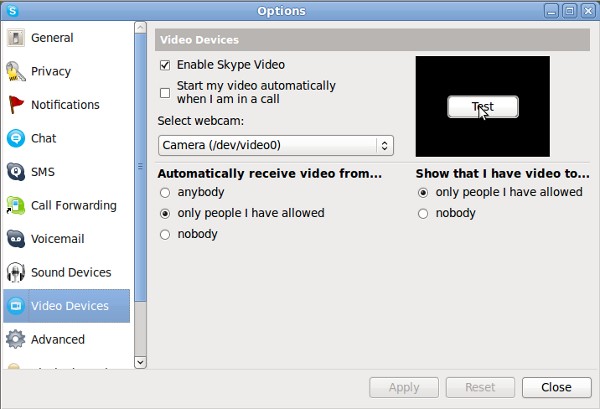
6. Let’s try the video. RIGHT click on the green skype logo in your task bar, then LEFT click on Options/Video Devices.
Now hit the test button. You should hopefully see an image. If you do not, don’t panic!
This article gave me the information I needed to get it working. But of course, I found a much simpler method then what was given.
7. If you have no video, and this was especially true with the some of the Web Chat Cameras, all you may need to do is to pre-load the needed libraries.
Using your favourite editor (I’ll use nano in this case) create a file called skype.sh in your home directory (cd ~ )
nano skype.sh
enter the following in the file:
#!/bin/bash

#

# script preloads the 32 bit video for linux (v4l) libs needed by 64 bit skype

#

# Wayno Guerrini http://www.pkill-9.com v 2.0
# added the export for the gtk 32 bit library -- GU -6/22/2012
#
export GTK_PATH="/usr/lib32/gtk-2.0"
LD_PRELOAD=/usr/lib32/libv4l/v4l1compat.so /usr/bin/skype
control-o (control plus the “oh” key) to save, and control-x (control plus the “x” key to exit)
note that the library path name /usr/lib/libv4l/ may be different on your machine. This happens the be the correct path for 32 bit Ubuntu 10.04. The LD_Preload loads the Video for Linux Libraries, which Skype needs, but doesn’t get.
Now change the icon executable location to the script we just created:
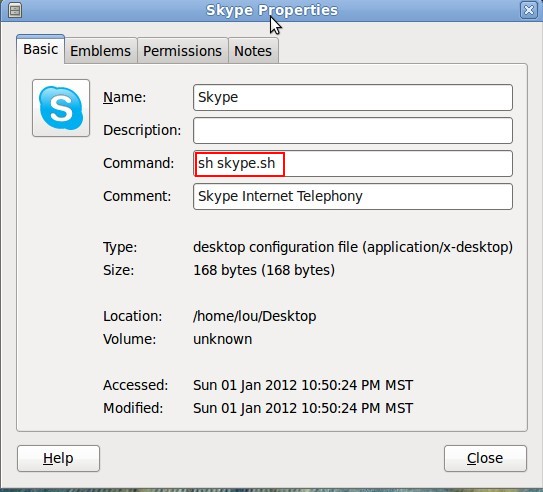
Repeat step 6, and the video should now work!
Wayno

Related Articles
9 users responded in this post
Thanks for writing this up, I guess I’m going to have to give it a try now.
thanks for sharing brother. god bless you.
After a lot of unsuccessful tries, this instructions finally helped me to have videoconference.
Using Ubuntu 12.04 64 bits.
Thank you for the post.
[…] While it may work in a 32 bit environment, it does not play nicely in 64 bit mode. I had a lot of fiddling to get video to work in the previous 2.35 verison. […]
[…] to run the new V4.0 of Skype in 64 bit Debian. The old trick of doing an LD_PRELOAD does NOT […]
Just found the path in Linux Mate 13 XCFE at LD_PRELOAD=/usr/lib/i386-linux-gnu/libv4l/v4l2convert.so
These instructions worked for me. Don’t forget to log in as root otherwise you will get permission denied errors.
Scott
It is NOT necessary to login as root. That is what the sudo command does.
Wayno
This is an older trick but worked like magic with my old logitech Quickcam and Linux Mint Cinamon. Skype now has video …. Cudos Wayno